
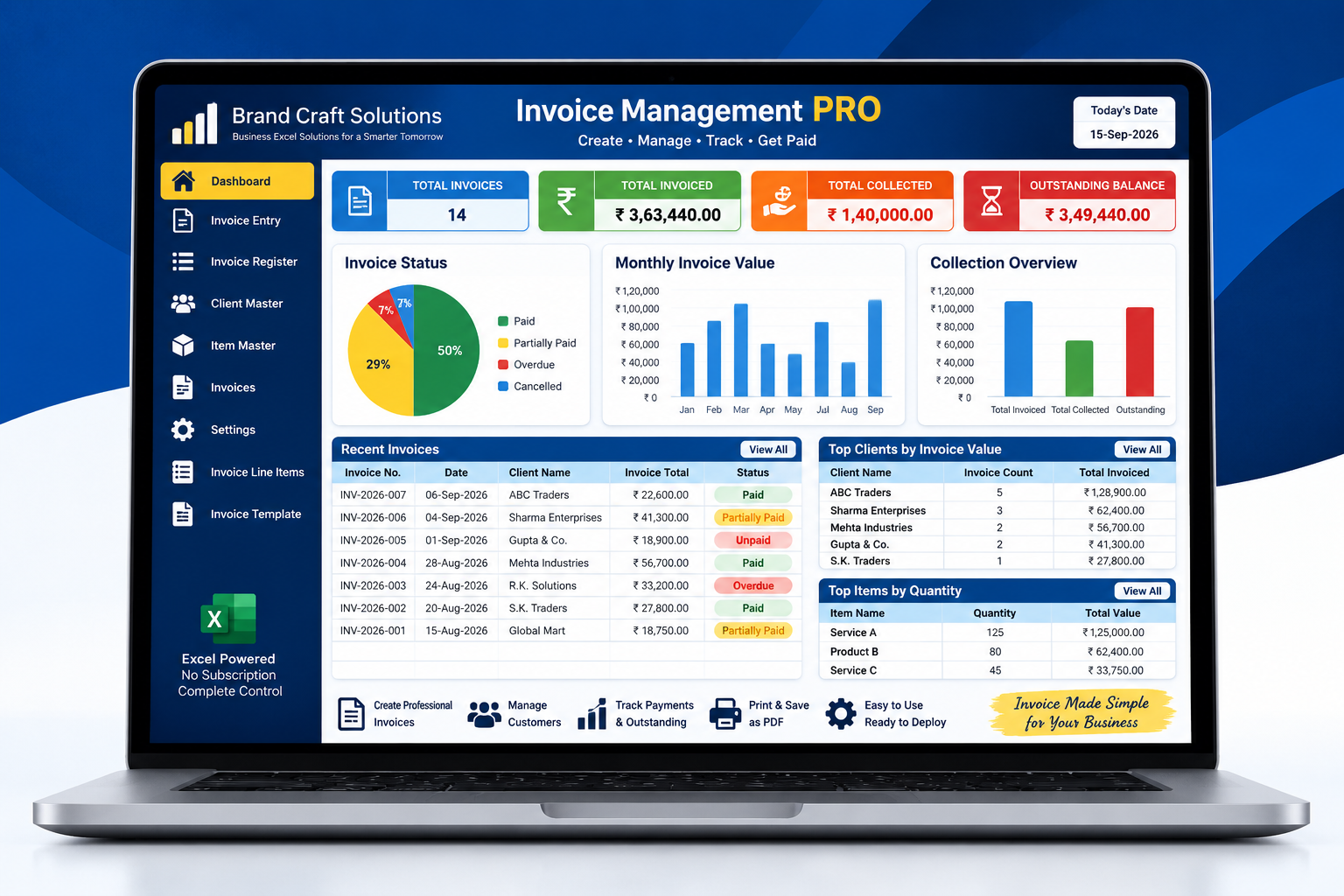
For many small businesses, creating an invoice is only the beginning of the invoicing process. After an invoice is issued, the business may need to track its due date, payment status, outstanding balance, customer information and collection activity.
When invoices are managed through scattered spreadsheets, paper records or individual files, it can become difficult to answer simple questions such as how much has been invoiced, how much has been collected, which invoices are outstanding and which customers require follow-up.
This is why invoice management should be viewed as an ongoing business process rather than simply the preparation of an invoice document.
What Is Invoice Management?
Invoice management is the process of creating, recording, organizing, tracking and following up on business invoices.
Depending on the business, the process may include customer details, invoice numbering, products or services, quantities, prices, taxes, payment terms, due dates, payment status and outstanding balances.
In simple terms:
Create → Record → Track → Collect → Report
A structured invoice management process helps turn individual invoices into useful business information.
Why Invoice Management Matters for Small Businesses
Small businesses often operate with limited administrative resources. A clear invoice process can reduce confusion and make financial follow-up easier.
Better invoice records
Keep invoice information organized and easier to retrieve.
Payment visibility
Track paid, partially paid, outstanding and overdue invoices.
Customer information
Maintain consistent records for customers and clients.
Outstanding balance control
Understand how much money remains to be collected.
Faster reporting
Review invoiced value, collections and outstanding amounts more easily.
Improved business control
Use invoice information to support better financial decisions.
What Is a Sales Invoice?
A sales invoice is a document issued by a business to a customer to record the goods or services supplied and the amount payable.
Depending on the business and applicable requirements, an invoice can include information such as the seller, customer, invoice number, invoice date, items or services, quantities, prices, taxes, total amount and payment terms.
The invoice becomes particularly useful when it is stored as part of a structured invoice register rather than being treated only as a document sent to the customer.
Invoice vs Purchase Order
Purchase orders and sales invoices are both important business documents, but they serve different purposes.
A business may therefore use purchase orders to control purchasing while using sales invoices to manage customer billing and collections.
Invoice vs GRN
A Goods Received Note and an invoice also serve different functions within a business process.
GRN
Records goods physically received from a supplier and information such as received, accepted and rejected quantities.
Invoice
Records the amount being charged to a customer or, in the case of a supplier invoice, the amount being requested from the buying business.
In purchasing environments, a supplier invoice may be compared with the purchase order and GRN before payment. In sales environments, the business invoice becomes part of the receivables and collection process.
The Invoice Management Process
A practical invoice management process can be organized into several connected steps.
Customer Order or Sale
The business receives an order or completes a sale for a customer.
Invoice Creation
The invoice is prepared with customer, item, quantity, price and applicable tax information.
Invoice Numbering
A unique invoice number is assigned according to the business's numbering process.
Invoice Issued
The invoice is provided to the customer with the relevant payment terms.
Payment Due
The invoice remains open until payment is received according to the agreed terms.
Payment Tracking
Payments are recorded and the invoice status is updated.
Outstanding Follow-up
Unpaid or overdue invoices can be identified for appropriate follow-up.
Reporting
Invoice, collection and outstanding data can be reviewed through reports or dashboards.
What Information Should an Invoice Contain?
The exact invoice requirements depend on the business, transaction and applicable regulations. A structured invoice record commonly includes information such as:
Invoice Numbering and Record Keeping
Consistent invoice numbering makes business records easier to organize and retrieve. A business should establish a numbering approach appropriate to its operations and applicable requirements.
The invoice register should maintain a clear relationship between the invoice number, date, customer, amount and payment status.
A useful invoice register can track:
- • Invoice number and date
- • Customer
- • Invoice value
- • Amount collected
- • Outstanding amount
- • Payment status
- • Due date
Invoice Tracking and Payment Status
Creating an invoice without tracking what happens afterwards leaves an important gap in the process.
A structured system can categorize invoices according to their current status. Common operational statuses include:
Paid
The invoice has been fully settled.
Partially Paid
A payment has been received but a balance remains.
Outstanding
The invoice remains unpaid within the tracking process.
Overdue
The invoice has passed its relevant payment due date.
These statuses help management understand the current state of customer billing and identify invoices that may require attention.
Accounts Receivable and Outstanding Invoices
Outstanding customer invoices represent amounts that the business expects to collect. Monitoring these balances is an important part of financial control.
Even a small business can benefit from knowing the difference between total invoiced value, total collected value and the remaining outstanding balance.
Total Invoiced
Value of issued invoices
Total Collected
Payments received
Outstanding
Amount still to be collected
Invoice Management Using Excel
Excel can be a practical option for small businesses that need structured invoice records without immediately adopting a large business software platform.
However, there is a difference between maintaining a simple invoice spreadsheet and using a structured Excel-based invoice management system.
Basic invoice spreadsheet
- • Manual invoice records
- • Basic customer information
- • Manual payment tracking
- • Limited reporting
Structured invoice management system
- • Invoice entry and numbering
- • Customer and item master data
- • Invoice register
- • Payment and outstanding tracking
- • Dashboard and reports
- • Print and PDF workflow
Manual Invoice Management vs a Structured System
Manual processes can work when transaction volumes are very small. As the number of customers, invoices and payments grows, however, keeping everything consistent becomes more difficult.
How Invoice Management Connects With Inventory
For businesses selling physical products, invoicing and inventory are closely connected. A sale may involve customer information, items, quantities and prices that also affect stock records.
A structured business management approach can therefore connect sales information with inventory information rather than treating every process as a separate activity.
Customer Order → Invoice → Stock Movement → Payment → Reporting
What Should an Invoice Management System Include?
A useful invoice management system should support the business process around invoices, not simply generate a printable document.
How to Choose an Invoice Management System
The right system depends on the size of the business, number of transactions, workflow complexity and reporting requirements.
Easy invoice creation
The process should be practical for the people actually preparing invoices.
Reliable records
Invoices should be stored in a consistent and searchable register.
Payment visibility
The system should make paid, partially paid and outstanding invoices easy to identify.
Customer management
Customer information should be organized for repeat transactions.
Reporting
Management should be able to review invoiced value, collections and outstanding balances.
Scalability
The solution should remain practical as invoice volume grows.
Frequently Asked Questions About Invoice Management
What is invoice management?
Invoice management is the process of creating, recording, organizing, tracking and following up on business invoices and their payment status.
Why is invoice management important for small businesses?
It helps businesses maintain organized invoice records, monitor payments, identify outstanding balances and improve financial visibility.
What is an invoice management system?
An invoice management system is a structured solution used to create, store, track and report invoice information and payment activity.
What is the difference between an invoice and a purchase order?
A purchase order generally communicates what a buyer wants to purchase, while an invoice records what a seller is billing a customer for.
What is the difference between an invoice and a GRN?
A GRN records goods received from a supplier, while an invoice records a billing transaction or amount payable.
Can invoice management be done in Excel?
Yes. Excel can be used for invoice management, particularly by small and growing businesses. A structured workbook can provide invoice entry, registers, payment tracking and reporting.
How should outstanding invoices be tracked?
Outstanding invoices can be tracked through an invoice register containing invoice numbers, customers, invoice values, payments received, balances, due dates and status.
What are common invoice statuses?
Common operational statuses include paid, partially paid, outstanding, overdue and, where relevant, cancelled.
How does invoice management connect with inventory?
For businesses selling physical goods, invoice information can contain the items and quantities associated with a sale and can therefore be connected with inventory processes.
Related Business Management Guides
Invoice management connects with several other business processes. Explore the related guides to understand how purchasing, receiving, inventory and invoicing fit together.
Inventory
Inventory Management for Small Businesses
Learn how structured inventory management improves stock visibility and operational control.
Read the Guide →Purchasing
Purchase Order Management
Understand how purchase orders help organize supplier purchasing and procurement records.
Read the Guide →Goods Receiving
Goods Received Note (GRN)
Learn how receiving records connect supplier deliveries, inspection and inventory control.
Read the Guide →